取代Bash 強大的Zsh (Zsh + Antigen + Oh my Zsh)
本篇教學使用Zsh + Antigen + Oh my Zsh,建立方便使用的terminal
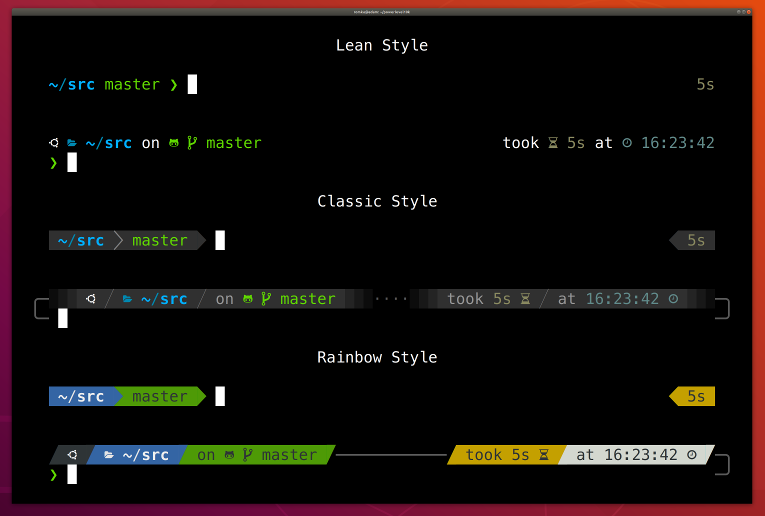
本篇教學使用Zsh + Antigen + Oh my Zsh,建立方便使用的terminal
名詞解釋
| 名詞 | 說明 |
|---|---|
| Zsh | 取代Bash的強大shell |
| Antigen | zsh的套件管理 |
| Oh my Zsh | zsh library |
Zsh
安裝
# Ubuntu
sudo apt-get install -y zsh
# CentOS
sudo yum install -y zsh
# OSX (Since OSX Catalina, Zsh has been installed with the OS)
brew install zsh
執行 zsh 初始化
zsh預設shell設為zsh
chsh -s /bin/zsh
# or
sudo chsh -s /bin/zsh "$USER"
如果遇到執行沒效果可於 sudo nano /etc/passwd 直接更改Shell
Antigen
安裝
curl -L git.io/antigen > antigen.zshConfigure
創建Antigen的設定檔 ~/.antigenrc
將要使用的plugins和theme放進這
以下為我常用的 ~/.antigenrc,包含 autojump 需要先安裝,根據你習慣自行調整plugin或theme
這邊選用p10k主題
# Load oh-my-zsh library.
antigen use oh-my-zsh

# Load bundles from the default repo (oh-my-zsh).
antigen bundle git
antigen bundle command-not-found
antigen bundle autojump
antigen bundle extract
antigen bundle docker

# Load bundles from external repos.
antigen bundle zsh-users/zsh-completions
antigen bundle zsh-users/zsh-autosuggestions
antigen bundle zsh-users/zsh-syntax-highlighting
antigen bundle supercrabtree/k

# Select theme.
# antigen theme robbyrussell
antigen theme romkatv/powerlevel10k

# Tell Antigen that you're done.
antigen apply
複製以下貼到你的 ~/.zshrc (如果沒有就創一個空的)
# Load Antigen
source ~/antigen.zsh
# Load Antigen configurations
antigen init ~/.antigenrc
檢查
# 進入zsh
zsh
# 確認安裝完成
antigen version
用指令檢查版本
antigen version
antigen list
antigen help
antigen update
Oh my zsh
oh my zsh內建一些好用的plugins和方便引入主題
上方Antigen已經透過 antigen use oh-my-zsh 引入oh my zsh
之後只要透過Antigen使用oh my zsh
# Turn on an Oh my Zsh plugin
antigen bundle plugin-name
antigen bundle git
antigen bundle command-not-found
antigen bundle docker

# Apply an Oh my Zsh theme
# antigen theme theme-name
antigen theme robbyrussell
自動更新
Oh my zsh會於有更新時詢問是否要更新,可以於 .zshrc 調整設定
nano ~/.zshrcDISABLE_AUTO_UPDATE=true 始終回复Yes並自動升級
DISABLE_UPDATE_PROMPT=true 始終回复No並且永不升級
# auto update oh-my-zsh
DISABLE_AUTO_UPDATE=true
# disable oh-my-zsh update
DISABLE_UPDATE_PROMPT=true
常用 Plugins
內建
列表:https://github.com/ohmyzsh/ohmyzsh/wiki/Plugins
- Git
- 濃縮很多 git 語法,習慣後可以快速執行git指令
- autojump
- 用
j直接執行 autojump - 跟據你常用的目錄,自動移動到某資料夾
- 需要先安裝 autojump
- 用
- extract
- 自動根據檔案副檔名執行對應的壓縮/解壓縮指令,
extract <filename>
- 自動根據檔案副檔名執行對應的壓縮/解壓縮指令,
- command-not-found
- 找不到指令時推薦對應的包
- docker
- 濃縮 docker 語法
其他
- zsh-users/zsh-completions
- 按 tab 自動完成指令
- zsh-users/zsh-autosuggestions
- 記憶下過的指令,於下次提示使用
- zsh-users/zsh-syntax-highlighting
- 語法高亮
- supercrabtree/k
- 更具可讀性的顯示目錄列表
客製化指令
新增一個 ~/.bash_aliases ,然後在 ~/.zshrc 下新增以下
# ...
# Load bash aliases
source ~/.bash_aliases
在 ~/.bash_aliases 新增指令
-
dockerstopall
暫停全部container
# Custom command
# ...
alias dockerstopall='docker ps --format '{{.Names}}' | xargs docker stop'
參考